
Cheap Hotels・Hotels70
Booking70 - Flights, Hotels, Rental CarsTravel & Local
3.691.00 Reviews
- Version
- 3.0.16
- Installs
- 500.00K
- Age Rating
- Everyone
Screenshots



Our Review of Cheap Hotels・Hotels70
 Analysis by Appyee
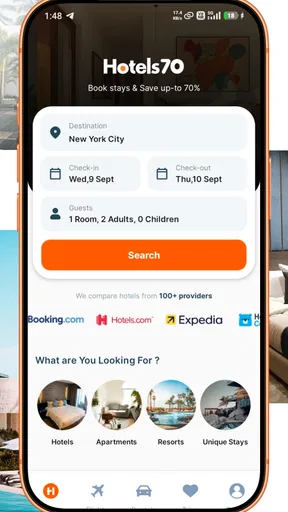
Finding a reasonably priced room can become surprisingly tiring when you are moving between hotel websites, comparison pages, and booking forms. I tried Cheap Hotels・Hotels70 as a focused Travel & Local app from Booking70 - Flights, Hotels, Rental Cars, and my impression is that it works best as a quick starting point rather than as the only tool in a complicated trip. Its purpose is simple: help me compare hotel prices in one place so I can narrow down where to stay without opening a long list of separate searches.
The app is free, aimed at everyone, and its modest presentation makes sense for people who want a direct hotel search instead of a full travel-planning suite. It has reached over 500 thousand installs and holds a 3.6 average from around 1.2 thousand ratings, which suggests a mixed but meaningful user experience. I would not treat that score as a verdict by itself. With hotel-search apps, the real question is whether the search results, dates, room details, and handoff to booking fit the way you travel.
Where the hotel-search experience can get stuck
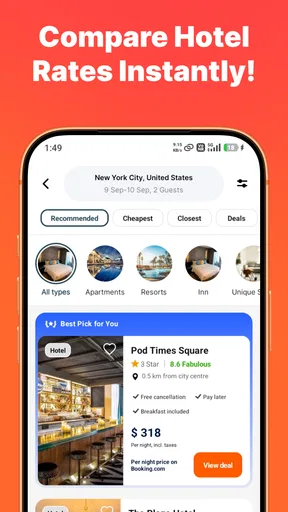
The first point of friction is usually not finding a destination; it is making sure every part of the search means what I think it means. A low-looking nightly price may depend on dates, room occupancy, taxes, cancellation conditions, or the final booking provider. I therefore use the first result screen for comparison, not as proof that the displayed figure is the complete amount I will pay.
That distinction matters especially when I am searching from a phone in a hurry. A result can look attractive because it matches the location and general budget, while the room type is not suitable for the actual trip. Before selecting anything, I check the dates, the number of guests, and whether the room description matches my needs. If I am traveling with another person, I also look for the difference between one room for two guests and separate rooms, because a small search-setting mistake can make the comparison misleading.
My most useful habit is to treat the first search as a filter, not a final decision. I note a few promising properties, then open the details carefully. This prevents the common mistake of choosing the first cheap option before checking location, room conditions, and the terms attached to that price.
Another place users may hesitate is the transition from comparing hotels to completing a reservation. Hotels70 is useful for bringing options together, but a comparison tool does not remove the need to read the final booking screen. The provider shown at the end may present its own payment steps, cancellation wording, or account requirements. I keep the selected dates visible while moving through that process and compare the final details with what I originally searched.
What I check before blaming the app
If a hotel does not appear, I first broaden the search slightly. A narrow date range, a very specific area, or an unusual occupancy combination can reduce the number of visible choices. Searching the wider city or a nearby district can reveal whether the issue is availability rather than an app failure. I then return to the exact area once I understand the general price and supply.
I also avoid judging the app from a single result. Hotel availability changes quickly, and different providers may show different room inventories. If one property disappears after I return to the results, I regard that as a reason to recheck the current search rather than assuming the app has permanently lost it.
Location names can create another practical problem. Large cities often contain districts, suburbs, airports, and nearby towns with similar names. I read the property address or map context where available instead of relying only on the destination label. A room that is technically in the right city may still be inconvenient for a station, airport, conference venue, or beach area.
Setup checks that make comparison more reliable
Cheap Hotels・Hotels70 runs on Android devices using Android 8.0 or later. That makes it accessible to many older phones, but an older compatible device may still struggle if storage is nearly full, the operating system is under heavy load, or the connection is unstable. Before I start a time-sensitive search, I close demanding background apps, make sure the phone has a dependable connection, and allow the search screen enough time to refresh.
I do not begin by changing every phone setting. I start with the basics: confirm that the app is the current installed version, restart it if a previous search seems frozen, and repeat the query with the same dates. The current version is 3.0.16, so keeping the installation updated is sensible when the store offers an update. An update can resolve general compatibility problems, but it cannot create rooms that are already sold out or correct an incorrect destination entered by the traveler.
When I am preparing a trip, I write down the exact search details before opening the app: arrival date, departure date, adults, children if relevant, rooms, and the neighborhood I actually want. This sounds basic, but it is one of the best ways to spot a setup error. If the result suddenly looks far too cheap or far too expensive, I compare the screen with those notes rather than trusting memory.
I also separate three different goals:
- Price discovery: finding the general cost of staying in an area.
- Property selection: deciding whether the hotel location and room suit the trip.
- Reservation completion: confirming the final conditions with the booking provider.
Hotels70 is most valuable during the first two stages. For the third, I slow down and read the final details. This division keeps me from expecting a comparison app to behave like a personal itinerary manager or a hotel loyalty account.
How I use it for a realistic last-minute trip
Imagine I have an evening train into a city and need a room near the station. I enter the city and dates, then compare several nearby areas instead of searching only for the station name. I first look for a workable price range, then inspect walking distance, transport access, and the room conditions. If the cheapest room requires a long transfer or has an unsuitable cancellation rule, it is not truly the best value for my situation.
For a late arrival, I pay particular attention to check-in information and contact details shown in the final property information. I do not assume that a room being available means that arrival at any hour is automatically accepted. If the booking page does not make the arrangement clear, I choose a property with clearer instructions or verify the matter through the booking channel before paying.
This is also where comparison shopping can save time without encouraging careless choices. I may select a slightly more expensive room if it avoids a costly taxi ride, a difficult transfer, or a non-refundable commitment that does not suit the uncertainty of my journey. The app helps me see alternatives, but I still make the travel decision.
Recovering a search when something goes wrong
When a search stalls, I use a simple recovery sequence rather than repeatedly tapping the same button. I return to the destination field, confirm the dates, and run the search again. If that fails, I try a broader destination or a nearby area. This tells me whether the problem is tied to the particular query or to the app session itself.
If the screen still behaves strangely, I close and reopen the app. On Android, I may also check whether the device has enough free storage and whether the connection works in another app. I avoid making a reservation while the result page is only partially loaded. A booking decision should be based on a complete room description and a stable final price display, not on a screen that has clearly failed to refresh.
For a disappearing result, I search the property again by destination and dates rather than relying on an old result card. If it returns with a changed price, I treat the latest result as the one that matters. Hotel inventory is time-sensitive, and keeping an old screen open can create false confidence.
For a mismatch between the list price and the final amount, I inspect the room selection and the booking summary line by line. I look for changes in occupancy, room type, dates, and the way taxes or fees are presented. I do not assume that the app alone caused the difference, because the final booking provider may be applying its own presentation or availability update.
What I do before completing a reservation
I save the important details in a note or screenshot for my own reference: property name, dates, room type, cancellation wording, and the final total shown before payment. This is not a substitute for a confirmation email or booking record, but it gives me a useful comparison if the page changes while I am checking out.
I also check whether the selected room is actually the room I intended. Hotel pages often offer several versions of what looks like the same accommodation: different beds, different occupancy, breakfast included or excluded, and flexible or restricted cancellation. The cheapest result is only useful if it meets the trip’s practical requirements.
If I am booking for someone else, I confirm whose name must appear on the reservation and who will present identification at arrival. I do not guess when the booking screen is unclear. A comparison app can help locate a suitable offer, but the reservation rules belong to the provider and property handling the booking.
For an urgent trip, I prefer a clear, slightly less attractive option over a confusing bargain. A room that can be understood and verified is safer than one that looks cheap but leaves the cancellation or arrival conditions uncertain. This is one of the main trade-offs I noticed: the app can reduce search time, but it does not remove the reading that follows the search.
When the app is not the cause of the problem
Many hotel-search frustrations originate outside Hotels70. A property may change its inventory, a booking provider may update the price, or the hotel may have different rules for different room categories. Slow loading can come from a weak mobile connection, while an apparently missing destination can result from spelling or choosing a nearby place with a similar name.
I therefore compare the same dates and occupancy carefully before drawing conclusions. If the app shows several properties but one familiar hotel is absent, I consider availability first. If every result looks unusual, I check the destination and dates. If the app works normally for a broad search but not for a very narrow one, the query itself is the more likely source of the difficulty.
There is also a difference between a hotel being listed and a hotel being a good match. A comparison result does not tell me whether the neighborhood feels right at night, whether the route from the airport is practical, or whether the property’s facilities meet a special need. I use the app to build a shortlist, then verify the details that matter most for my circumstances.
This is why I would not use Hotels70 as my only source for a complex family trip, an accessibility-sensitive stay, or a reservation with unusual requirements unless I could independently confirm the relevant arrangements. For a straightforward room search, it is more convenient. For a trip where one overlooked condition could cause a serious problem, I want a direct conversation with the property or a booking service that makes those requirements especially clear.
How it compares with familiar alternatives
Compared with searching hotel websites one by one, Hotels70 is more efficient at the discovery stage. I can begin with a single destination and compare a range of possibilities instead of repeating the same dates across multiple sites. That is its clearest advantage for travelers who care about price and want to avoid a scattered search.
Compared with booking directly through a hotel’s own app or website, it may be less useful once I already know the exact property I want. Direct booking can provide a clearer relationship with the hotel, and frequent guests may prefer using an existing loyalty account or managing reservations in one place. I would use Hotels70 to check the market, then consider the direct option if its conditions are clearer or better suited to the trip.
Compared with a broad travel app that also handles flights, maps, loyalty programs, itineraries, and attractions, this app feels narrower. That can be a benefit when I only need a hotel comparison, because extra planning tools can make a simple task feel crowded. It is a limitation when I want one place to manage the entire journey after booking.
My practical approach is to use Hotels70 at the beginning, shortlist realistic properties, and then verify the final offer before committing. That workflow gives the app a clear job and avoids expecting it to replace every other travel tool.
Who should use it and who should skip it
I would recommend Cheap Hotels・Hotels70 to a traveler who regularly compares accommodation prices, is comfortable checking booking details, and wants a free way to begin a hotel search. It is especially useful when I am flexible about the property and need to understand what different areas and room types cost before making a decision.
It also suits short breaks, work trips, and last-minute searches where speed matters but the requirements are ordinary. The ability to compare options before choosing a provider can prevent me from settling too quickly on the first familiar hotel.
I would be more cautious if I needed a highly specialized stay, a complicated group arrangement, or extensive post-booking organization. Someone who values loyalty benefits above price comparison may prefer a hotel chain’s own service. Someone who wants flights, transport, reservations, and a complete itinerary in one interface may find this focused hotel tool too limited.
The app is free and carries an Everyone age rating, so there is little barrier to trying it. Still, free access should not be confused with a guarantee that every displayed offer will be the best final deal. I compare the complete conditions, not just the first number that catches my eye.
My practical verdict after using it
Hotels70 is a useful hotel-comparison starting point with a clear purpose. I like it most when I need to scan accommodation choices quickly, compare nearby areas, and create a shortlist without visiting many separate hotel pages. Its strongest quality is not that it makes every booking effortless; it is that it helps me organize the early part of the search.
The main friction comes after the initial discovery. Dates, occupancy, room categories, cancellation terms, property location, and final totals still need careful attention. When a result looks wrong, I recommend checking the search settings, repeating the query, broadening the area, and testing the connection before assuming the application is responsible.
With a 3.6 average and around 1.2 thousand ratings, I see it as a practical tool worth trying rather than an unquestionable recommendation for every traveler. The developer, Booking70 - Flights, Hotels, Rental Cars, has positioned it in the Travel & Local space as a focused hotel-search option, and that focus is both its appeal and its boundary.
I would keep it on my phone for price discovery, but I would never skip the final verification step. If you want a free way to compare hotel possibilities and are willing to read the booking details yourself, it can save time. If you need a full travel organizer, guaranteed personal assistance, or unusually specific accommodation arrangements, a direct hotel channel or broader travel service may be the better choice.
Verdict
Strengths of Cheap Hotels・Hotels70
- Useful for comparing budget hotel prices in one place.
- Simple interface makes searching quick for casual travelers.
- Helpful filters can narrow results by location and price.
- Good option for finding last-minute accommodation deals.
- Hotel listings may include essential details before booking.
Limitations of Cheap Hotels・Hotels70
- Some listings may redirect you to external booking websites.
- Prices and availability can change before completing a reservation.
- Hotel information may vary in detail between different listings.
- Budget-focused results may offer fewer premium accommodation choices.
- Results can depend heavily on the selected destination and dates.
Similar Picks in This Category
View All
Google Maps
Google LLC3.4

Google Maps Go
Google LLC4.1

Booking.com: Hotels & Travel
Booking.com Hotels & Vacation Rentals4.8

Google Earth
Google LLC3.8

Skyscanner Flights Hotels Cars
Skyscanner Ltd4.8

trivago: Compare hotel prices
trivago N.V.4.4
Frequently Asked Questions
What is Cheap Hotels・Hotels70, and what can I use it for?
Cheap Hotels・Hotels70 is a hotel-search and booking app designed to help travelers compare accommodation prices in different destinations. After entering a city, travel dates, and the number of guests, you can browse available properties, review room information, compare offers, and check important details before making a reservation. It is mainly useful for finding budget-friendly hotels quickly from a mobile device.
Does Cheap Hotels・Hotels70 really offer the lowest hotel prices?
The app can help you find competitive hotel rates by displaying and comparing available offers, but it should not be assumed that every search will show the absolute lowest price online. Rates may change according to dates, demand, taxes, currency, cancellation conditions, and the booking provider. Before confirming, compare the final total and check whether extra fees, breakfast, or resort charges are included.
Can I cancel or change a reservation made through the app?
Cancellation and modification options depend on the individual hotel offer and the booking partner handling the reservation. Some rooms allow free cancellation until a specific deadline, while discounted or prepaid rates may be non-refundable. Always read the cancellation policy shown during booking and keep your confirmation email. If changes are needed, contact the provider listed in the reservation details as soon as possible.
Is Cheap Hotels・Hotels70 safe to use for hotel reservations and payments?
The app is intended to simplify hotel searches and reservations, but users should still review the provider and payment details before completing a purchase. Check that the booking page uses a secure connection, confirm the hotel’s contact information, and save all confirmation documents. Avoid sharing payment details through unofficial messages, and contact customer support or the booking partner if anything appears inconsistent.
What should I check before booking a hotel with Cheap Hotels・Hotels70?
Before booking, verify the exact travel dates, guest count, room type, total price, taxes, payment timing, and cancellation rules. It is also worth checking the hotel’s location, review score, facilities, check-in times, and whether breakfast, Wi-Fi, parking, or other services cost extra. Reading the full offer details can prevent unpleasant surprises, especially when choosing a very low-cost or non-refundable room.
